Hi,
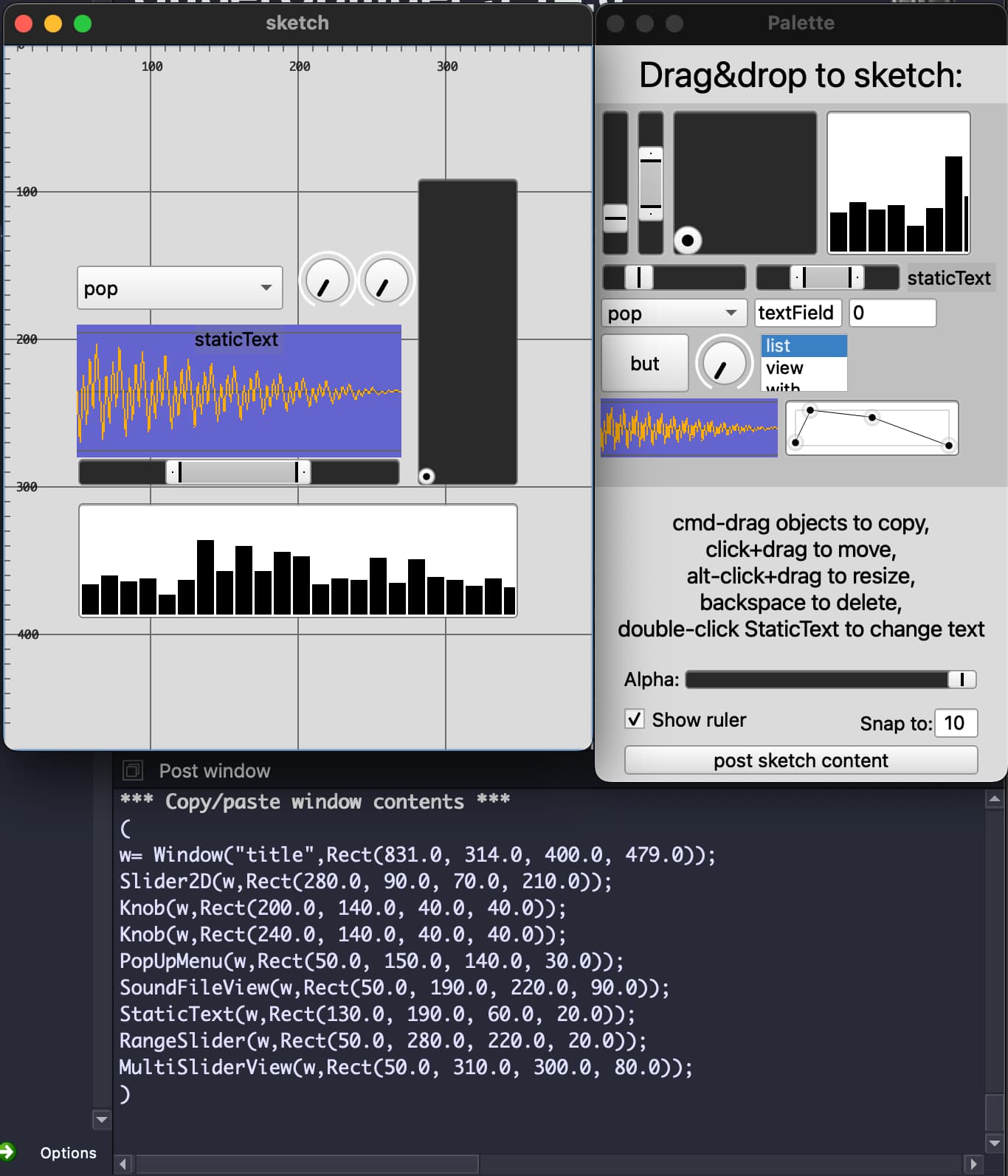
From the first post I thought maybe you were looking for a Max/PD/Audiomulch etc solution where you place and “connect” GUI elements that have audio functions. But if you’re looking for something to sketch out GUI elements by placing and dragging around GUI elements and get the code for it (as Rects) then I have something that could be of use, looks like this:
It should be pretty self-explanatory - drag GUI elements from the “palette” window to the “sketch” with cmd-drag, modify them and in the end post the result to the post window.
I have found it useful to sketch out odd looking GUIs with a lot of space between the elements, like for ex a gamepad. Or lowering the alpha value of the sketch window and place it above another window where I need to find the exact Rect values of something.
(
// GUI SKETCHER - blindmanonacid
var win, guis, v;
var snap= 10, sf;
var a, ax= 0, ay= 0, bx= 0, by= 0;
var d, alphaSpec, previousBounds;
var w;

alphaSpec= [0, 1, -4].asSpec;
sf= Array.fill(99, {|i| (pi*i).wrap(-1.0, 1.0)*((i-99).abs/99) });

win= Window("Palette", Rect(Window.screenBounds.width-280, Window.screenBounds.height, 280, 500)).front;

StaticText(win, Rect(0, 0, win.bounds.width, 40))
.string_("Drag&drop to sketch:")
.font_(Font.default.size_(24))
.align_(\center);

v= View(win, Rect(0, 40, 280, 260));
v.decorator = FlowLayout(win.view.bounds);
v.background= Color.grey.alpha_(0.3);

guis= [
Slider(v, 20@100).value_(0.2),
RangeSlider(v, 20@100).lo_(0.3).hi_(0.7),
Slider2D(v, 100@100),
MultiSliderView(v, 100@100).size_(30).isFilled_(1).value_(Array.exprand(30, 0.2, 0.9)),
Slider(v, 100@20).value_(0.2),
RangeSlider(v, 100@20).lo_(0.3).hi_(0.7),
StaticText(v, 60@20)
	.string_("staticText")
	.background_(Color.grey.alpha_(0.2)),
PopUpMenu(v, 100@20).items_(["pop", "up", "menu", "with", "some", "items"]),
TextField(v, 60@20).string_("textField"),
NumberBox(v, 60@20),
Button(v, 60@40).states_([["but"]]),
Knob(v, 40@40),
ListView(v, 60@40).items_(["list", "view", "with", "some", "items"]),
SoundFileView(v, 120@40).data_(sf),
EnvelopeView(v, 120@40).value_([[0.0, 0.1, 0.5, 1.0],[0.1,1.0,0.8,0.0]]).thumbSize_(12)
];

guis.do({|it|
	it.beginDragAction_({|v, x, y| v });
});

StaticText(win, Rect(0, 310, 280, 100))
.align_(\center)
.string_("cmd-drag objects to copy,
click+drag to move,
alt-click+drag to resize,
backspace to delete,
double-click StaticText to change text")
.font_(Font.default.size_(15));

w= Window("sketch", Rect(Window.screenBounds.width-780, Window.screenBounds.height, 400, 400)).front;

d= DragSink(w, Rect(0, 0, w.bounds.width, w.bounds.height))
.background_(Color.grey.alpha_(0.0))
.receiveDragHandler_({
	|v, x, y|
	var drag, gui;
	drag= View.currentDrag;
	//drag.class.postln;
	//[drag, v, x, y].postln;
	gui= drag.class.new(w, Rect((x-bx).round(snap),(y-by).round(snap),drag.bounds.width,drag.bounds.height));

	gui.mouseDownAction_({|v, x, y, mod, but, click|
	//[x, y].postln;
	a= v;
	ax= x;
	ay= y;
		if(click==2, {
			if(v.class == StaticText, {
				TextField(w, Rect(gui.bounds.left, gui.bounds.top, 120, 20), false, false)
				.focusLostAction_({|v| v.remove })
				.string_("input text, hit enter")
				.focus
				.keyDownAction_({|v, c, mod, uni, key|
					if(key==36,
						{gui.string= v.string;
							v.remove; });
				});
			});
		});
	false;
	});
	gui.mouseMoveAction_({|v, x, y, mod|
		if (mod.isAlt, {
			v.resizeTo(x.round(snap).clip(1, 10000), y.round(snap).clip(1, 10000));
			if (v.class == StaticText, {
				v.font= Font.default.size_(v.bounds.height*0.6);
			});
		});
	false;
	});
	gui.beginDragAction_({|v, x, y|
		bx= x; by= y; v; });
	{gui.items= drag.items}.try;
	{gui.data= sf}.try;
	{gui.string= drag.string}.try;
	{gui.value= drag.value}.try;
	{gui.x= drag.x; gui.x= drag.x; }.try;
	{gui.lo= drag.lo; gui.hi= drag.hi; }.try;
	{gui.background= drag.background; }.try;
	{gui.thumbSize= 12; }.try;
	{gui.isFilled= 1; }.try;
	gui.canFocus= true;

	gui.keyDownAction= {|v, c, mod, uni, key|
		if(key == 51, {v.remove});
	};
	bx= 0; by= 0;
});
w.view.mouseMoveAction_({|v, x, y, mod|
	//[x, y].postln;
	if (mod.isAlt.not, {
		a.moveTo((x-ax).round(snap), (y-ay).round(snap));
	});
	if(previousBounds != a.bounds, {
		(a.class.asString++"(w, "++a.bounds.asString++")").postln;
	});
	previousBounds= a.bounds;
});

w.view.onResize= ({d.resizeTo(w.bounds.width, w.bounds.height)});

Button(win, Rect(20, win.bounds.height-25, 240, 20))
.states_([["post sketch content"]])
.action_({
	var winVar= "w", guis;

	guis= w.view.children;
	guis.removeAt(0);
	guis.sort({|a, b| a.bounds.left > b.bounds.left });
	guis.sort({|a, b| a.bounds.top < b.bounds.top });

	"*** Copy/paste window contents ***".postln;
	"(".postln;
	(winVar++"= Window("++"title".asCompileString++","++w.bounds.asString++");").postln;

	guis.do({|it, i|
		(it.class.asString++"("++winVar++","++ it.bounds.asString++");").postln;
	});
	")".postln;
});

StaticText(win, Rect(180, win.bounds.height-50, 60, 20))
.string_("Snap to:");

NumberBox(win, Rect(230, win.bounds.height-50, 30, 20))
.step_(1)
.clipLo_(1)
.value_(snap)
.align_(\center)
.action_({|v| snap= v.value });

StaticText(win, Rect(20, win.bounds.height-80, 60, 20))
.string_("Alpha:");

Slider(win, Rect(60, win.bounds.height-77, 200, 15))
.value_(1)
.action_({|v| w.alpha= alphaSpec.map(v.value) });

CheckBox(win, Rect(20, win.bounds.height-50, 200, 15))
.string_("Show ruler")
.action_({|v|
	if(v.value, {
		w.drawFunc = {
			Pen.strokeColor = Color.black.alpha_(0.5);
			((w.bounds.height/10).asInteger).do({|i| //vertical
		Pen.moveTo(0@(i*10));
		if(i%10 == 0, {
			Pen.lineTo(8@(i*10));
			Pen.stringAtPoint((10*i).asString,10@((i*10)-5), Font("monaco", 8), Color.black.alpha_(0.8));
			Pen.strokeColor = Color.grey.alpha_(0.2);
			Pen.lineTo(w.bounds.width@i*10);
			Pen.strokeColor = Color.black.alpha_(0.5);
		},{
			Pen.lineTo(5@(i*10));
		});
	});
	((w.bounds.width/10).asInteger).do({|i| //horizontal
		Pen.moveTo((i*10)@0);
		if(i%10 == 0, {
			Pen.lineTo((i*10)@8);
					Pen.stringAtPoint((10*i).asString,((i*10)-5)@10, Font("monaco", 8), Color.black.alpha_(0.8));
			Pen.strokeColor = Color.grey.alpha_(0.2);
			Pen.lineTo((i*10)@w.bounds.height);
			Pen.strokeColor = Color.black.alpha_(0.5);
		},{
			Pen.lineTo((i*10)@5);
		});
	});
Pen.stroke;
};
		w.refresh;
	}, {
		w.drawFunc = {}; w.refresh;
	});
});

w.onClose= { {win.close}.try; };
win.onClose= { {w.close}.try; };


)