If anyone is wondering where this barrage of quark libs is coming from: I have decided to use my time, now that I am retired, to abstract the large amount of SC GUI work I did over the last 20 years into some generally usable classes, and to share all that work with the community. I won’t be publishing my entire IDE, because it is MUCH too messy, but I might write a short book about how to create one like on SuperCollider Projects | Jost Muxfeldt . Cheers!
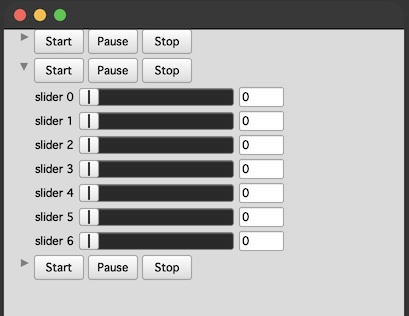
I normally recommend using CollapseView, but I have added documentation on how to use CollapseButton. You might want this if you have a complex GUI class using FlowVIews, and you just want to add a CollapseButton.
(
FlowView(bounds:Window.flipY(Rect(300,200,400,600))).flow{|w|
3.do{arg i;var cb;
FlowView(w,Rect(0,0,300,300))
.flow{|w|
w.decorator.margin_(0@0); // recommended
w.flow{arg w; // NOTE THE DOUBLE LAYER OF FLOW VIEWS.
//This is mandatory for the CollapseButton to work correctly.
// offset_: prevent hiding the first 4 items (including arrow).
cb= CollapseButton(w).offset_(4);
Button.new(w,Rect(0,0,50,25)).states_([["Start"]]);
Button.new(w,Rect(0,0,50,25)).states_([["Pause"]]);
Button.new(w,Rect(0,0,50,25)).states_([["Stop"]]);
w.startRow;
7.do{|i|
EZSlider.new(w,Rect(0,0,270,20), "slider"+i);
};
}
};
cb.valueAction_(i-1); // converts to boolean. collapse the first two.
// You must call valueAction_ AFTER running .flow
};
}
)