This library is a set of tools designed to help you design performative instruments and/or compositions in SuperCollider.
One of the main goals of this library is to create a framework for managing and designing musical perameters: Parameters that contain compositional decision making and encourage structural improvisation.
Interacting with the parameters should be as easy as possible. For this reason, all of them can be either set with direct values or using a normalized range of floating point numbers as inputs (0.0 to 1.0) — this makes it simple to map them to controllers, and it allows the creation of automatic GUI’s, randomization, snapshots and other convenient tricks for interacting with them in complex and fun ways.
Features
Easily design parameters or full instruments
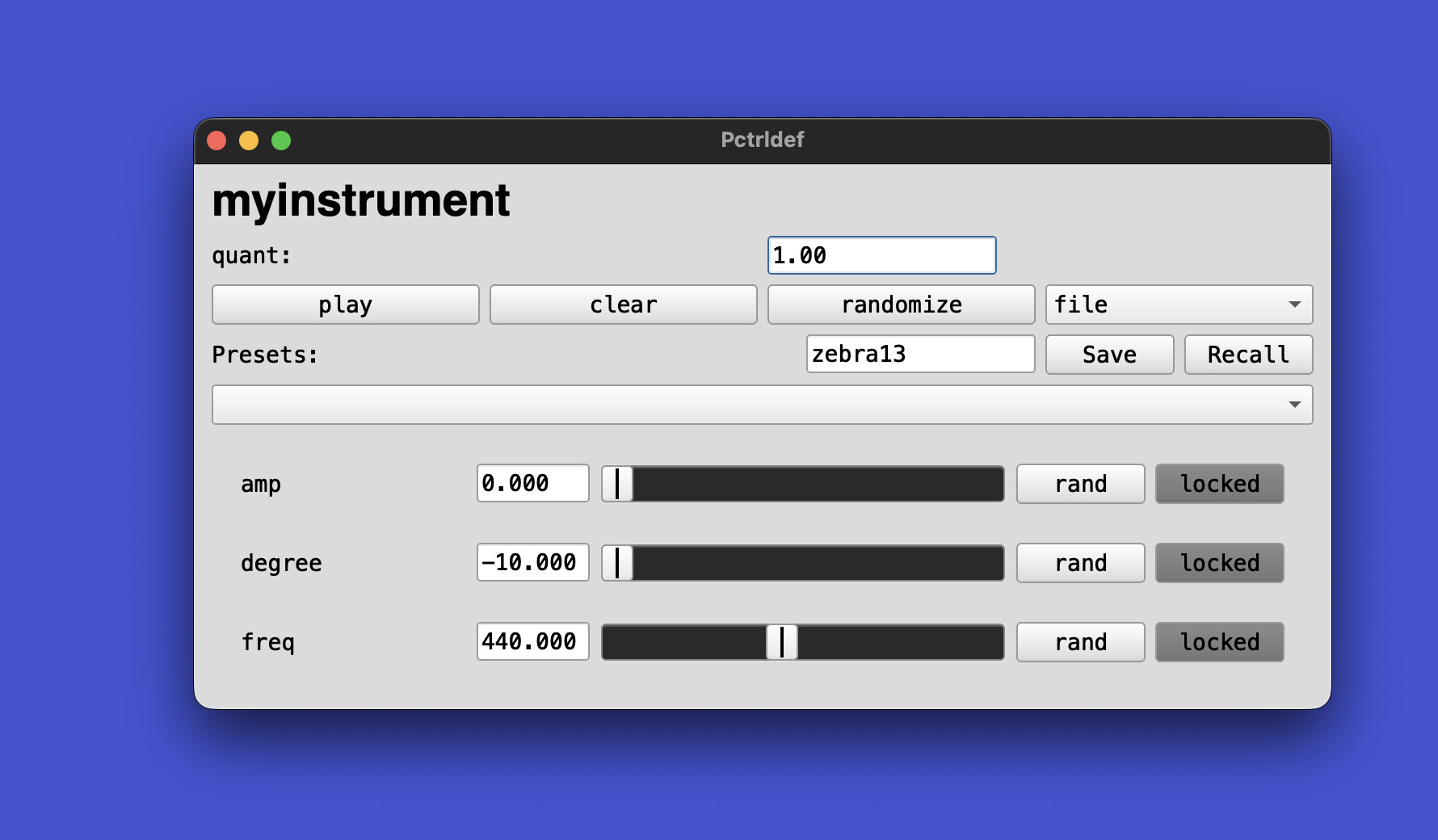
Automatic gui creation based on parameters
New type of spec: ArrayedSpec for parameters made from arbitrary lists/choices (including non-numeric objects)
Automatically map a normalized input (0.0-1.0) to any parameter range, included parameters of multiple choice (ArrayedSpec)
Presets and snapshots for saving/restoring parameter states
Randomization and per-parameter locking to protect values from randomize/preset changes
Pattern-native single parameters: Pparam / PparamDef. Advanced versions of Pdefn with spec built into them, and other features.
Pcontrol / Pctrldef: event-pattern instruments with embedded Pparams and automatic GUI
ParamFuncSet / ParamsDef: grouped parameters with callbacks, snapshots, restore, GUI.
Export as MIDI from patterns
Def-style globals for easy live-coding access (def variants of classes)
Automatic GUI generation for parameters, parameter sets, and instruments
Unit-tested codebase with PerformativeTest.runAll() for running tests
I’ve been working on this package for a long time and have use it extensively for creating performance instruments and writing music but now it’s finally ready to meet the public after having been tested on stage and in the studio for a while Have fun!
Very cool! I’ll admit that I don’t think enough about parameter design. Frameworks that encourage users to think about parameters at a higher level of abstraction – nice idea
However, is there any reason to include the FOSC extension in your quark?
"https://codeberg.org/madskjeldgaard/Performative".include

Installing Performative
Installing Monolithic
Installing CuePlayer
Adding path: /Users/prko/Library/Application Support/SuperCollider/downloaded-quarks/CuePlayer
CuePlayer installed
Installing wslib
Installing XML
XML installed
wslib installed
Installing fosc
Adding path: /Users/prko/Library/Application Support/SuperCollider/downloaded-quarks/fosc
fosc installed
Installing PolyBuf
Adding path: /Users/prko/Library/Application Support/SuperCollider/downloaded-quarks/PolyBuf
PolyBuf installed
Installing Singleton
Adding path: /Users/prko/Library/Application Support/SuperCollider/downloaded-quarks/Singleton
Singleton installed
Installing Pxshuf
Adding path: /Users/prko/Library/Application Support/SuperCollider/downloaded-quarks/Pxshuf
Pxshuf installed
Installing wslib
Installing XML
XML installed
wslib installed
Adding path: /Users/prko/Library/Application Support/SuperCollider/downloaded-quarks/Monolithic
Monolithic installed
Adding path: /Users/prko/Library/Application Support/SuperCollider/downloaded-quarks/Performative
Performative installed
... the class library may have to be recompiled.
-> https://codeberg.org/madskjeldgaard/Performative
According to Fosc installation gude, the recommended location is Platform.userExtensionDir or Platform.systemExtensionDir:
Install Fosc
Download the fosc master branch and unzip. Rename the ‘fosc-master’ folder to ‘fosc’. Move the ‘fosc’ folder to your SuperCollider Extensions directory. Information on installing SuperCollider extensions can be found here: Using Extensions | SuperCollider 3.14.0 Help.
Class duplication errors can be easily resolved by removing the path Fosc from the quarks paths.
I am attaching the full error logs. error.txt (46.9 KB)
The following error is not related to FOSC, but it should be resolved.
ERROR: Found duplicate instance variable name 'data'
  in file '/Users/prko/Library/Application Support/SuperCollider/downloaded-quarks/Monolithic/Classes/Patches-Performances-Structure/SceneDef.sc'
  line 3 char 8:
I think it would be nice if users could use your package without confronting these steps!
 Have fun!