Is there any shortcut to switch between open tabs without using the mouse?
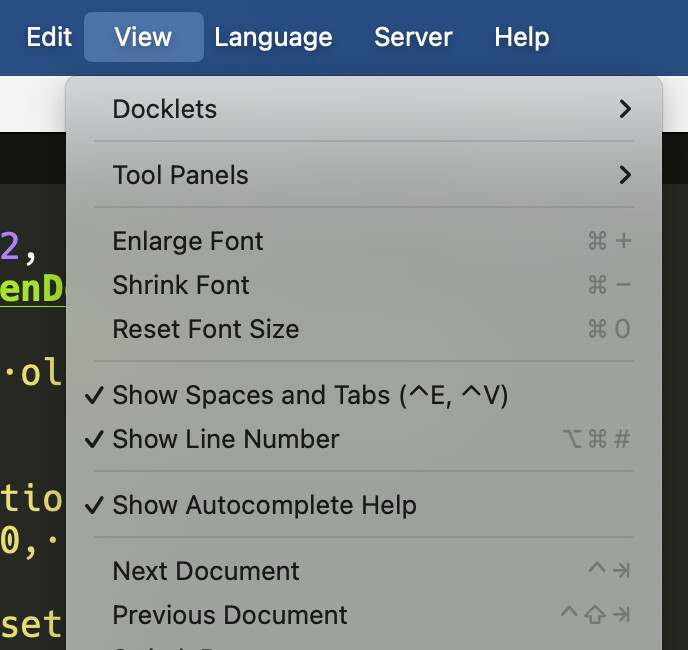
thanks, works also on Linux. Good I asked, cause it does not appear in the shortcut list, so I thought it is not available.
What also would help a lot is to have emacs bindings in the supercollider ide. At leat jump to beginning of line (Ctrl-A), end of line (Ctrl-E), move up one line (Ctrl-p), down (Ctrl-n), delete line (Ctrl-K), etc.
Would this be easy to implement?
“Next document” and “Previous document” are in the preferences shortcut list. They’re easy to overlook, though, because the list is alphabetical, so “next” and “previous” are separated by several entries – in my mind, these are closely related operations, but they don’t appear as such in the panel.
I switched them to alt-right-arrow and alt-left-arrow respectively, since ctrl-shift-tab to go left is physically awkward (IMO – I understand that we’re following browsers’ lead here).
Tricky, since for example there’s already ctrl-n for new document, ctrl-p to select post window, ctrl-e to show the command-line widget, and ctrl-a for select all. Select-all is hardcoded (it doesn’t even appear as a menu command, meaning it’s probably just baseline Qt text editor behavior). Those other three commands can be remapped, but then up/down line etc are not available in the shortcuts dialog. I’m not sure how difficult it would be to make those available for remapping. Adding preferences for them is easy. Overriding their behavior in the Qt widget shouldn’t be too bad, I guess?
Ctrl-K does exist btw: delete to end of line. But I can’t find this in any menus or shortcut options.
hjh
1 Like