i was using windows. but my computer started going peanuts, and wild bananas, and i had to temporarily or permanently switch to linux. first installed mabox, but didn’t go fine. i mean, initially it did. but then i started experiencing all sorts of issues, with software installation, hard disk and so. at some point, i decided to move back into windows. but then i got my bluetooth firmware messed up, which means that now i cannot using my set of headphones. and now i am back into linux, this time with debian 13, which is already way much better since i last installed debian (which may have been version 9 or 10, or so). this is fast, efficient the desktop manager looks amazing. it’s properly optimized and so. the issue, is that i have been experiencing a problem that i already had experienced with supercollider on debian, which is the fact that supercollider doesn’t schedulle realtime priority correctly. i tried to solve that with qjackctl. initially went fine, although at some point i was not able to use my internal speakers. but now i am experiencing all sorts of issues with realtime schedulle priority. can someone help me to fix this.
The user account that is running SC should be added to the audio group to acquire low-latency privileges.
https://wiki.ubuntu.com/Audio/TheAudioGroup
Jack and real-time privileges
In recent versions of Ubuntu, when installing the Jack daemon, it optionally installs a file giving every user in the audio group real-time privileges, and possibilities to prevent program memory from being swapped. This can be necessary for running low-latency audio without drop-outs. The risk involved here is that if a malicious or badly written program makes use of these privileges, it can cause the entire system to lock up, or at least become very sluggish.
sudo adduser USER_NAME audio
That’s not guaranteed to fix everything but AFAIK this is recommended for SC usage.
hjh
thank you so much for your keen help and support. this does fix my issues with realtime priority, but doesn’t fix my issues with jack. which doesn’t simply start. any fix and feedback?
If you want to use Bluetooth audio with SC sometimes as well as the built-in speakers, then you’ll need Pipewire instead of JACK. (To use Bluetooth audio with normal JACK, you’d have to set up bluez-alsa, which is tricky, and unreliable – where “unreliable” may be as bad as, you can use it for 15 minutes and then it locks up your system so that you have to reboot. I would not recommend this approach! Bluetooth audio works transparently with Pipewire.)
I would personally highly recommend Pipewire. There’s no longer any strong reason to suffer through configuring JACK and PulseAudio to play nicely together.
I’m afraid that it’s 10:51 pm where I live, so “any fix” for JACK is not a question I can answer at this time beyond my advice to dump JACK and install Pipewire. System configuration problems can get tricky and I plan to be asleep in 20 minutes, so I’ll need to disengage now. (Also FWIW, I got Pipewire from its default installation in Ubuntu Studio 24.04 – I don’t have experience installing it. Any issues with that would probably be better addressed on a Linux audio forum rather than the SC forum.)
hjh
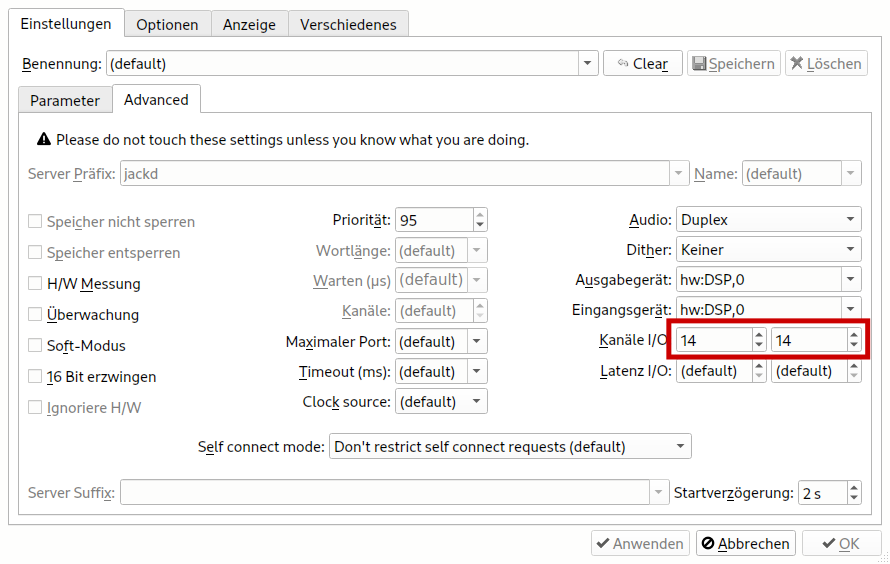
Have you made sure the number of in- and outputs in Jack matches the number of in- and outputs on your soundcard? That has often been a show stopper for me. It’s not enough to leave these settings at ‘default’ (in my experience).
Btw we need 3.14 on debian which is not available yet…
Yes, I didn’t get anywhere regarding this with my mail from a month ago as well:
building is pretty easy